QPanel · in ontwikkeling
Je show, op je tafel.
QPanel is een 10" touchpanel voor op tafel, gemaakt voor QBridge. Eén netwerkkabel, en je hele show staat onder je vingers: cues, tijden, GO.
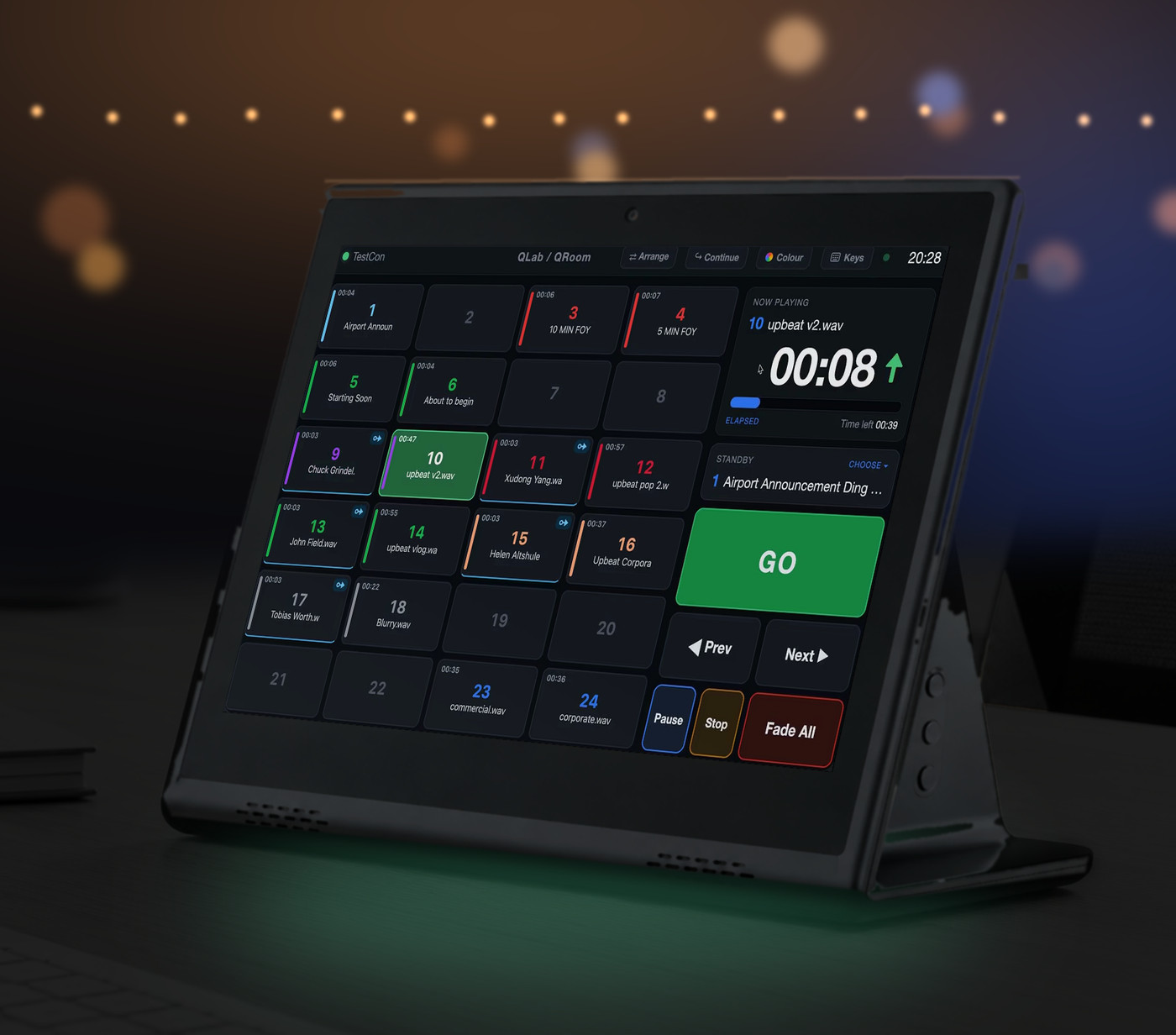
Tijdens de show
GO binnen handbereik
Een grote GO-knop, met Vorige, Volgende, Pauze, Stop en Fade All ernaast.
Je hele cuelijst
Cuenummers, namen, kleuren en looptijden, live uit QLab of QRoom.
Tijd in beeld
Wat er speelt, met verstreken en resterende tijd, en de standby-cue erbij.
Instellen op het panel
Arrange
Zet cues op de plek die jij wilt: sleep een cue naar een andere knop.
Colour
Geef cues een kleur, direct op het panel. Zo zie je in één oogopslag wat muziek, effect of aankondiging is.
Continue
Stel per cue de continue-modus in, net als in QLab: niet doorgaan, auto-continue of auto-follow.
Keys
Deel de knoppen in: bepaal welke cue of functie onder welke knop zit, zodat het panel past bij jouw show.
De hardware
Eén kabel
Stroom en netwerk over één netwerkkabel (PoE). Geen losse voeding op je tafel.
Alleen QPanel
Het panel start direct in QPanel. Geen tablet om te beheren, geen meldingen tijdens de show.
Voor op tafel
Een 10" touchscreen op een vaste voet, voor de regietafel, de inspiciënt of de techtafel.
Werkt met QBridge
QPanel praat via het netwerk met QBridge, en QBridge stuurt QLab of QRoom aan. Geen QPanel nodig? Je kunt QBridge ook bedienen met het webpanel in een browser, een Stream Deck of X-keys.
Op de hoogte blijven?
QPanel is in ontwikkeling. Wil je bericht als hij leverbaar is, of wil je hem testen in je theater? Mail [email protected].
QPanel · in development
Your show, on your desk.
QPanel is a 10" tabletop touch panel, made for QBridge. One network cable, and your whole show is under your fingers: cues, times, GO.
During the show
GO within reach
A big GO button, with Prev, Next, Pause, Stop and Fade All next to it.
Your whole cue list
Cue numbers, names, colours and durations, live from QLab or QRoom.
Time at a glance
What is playing, with elapsed and remaining time, and the standby cue.
Set up on the panel
Arrange
Put cues where you want them: drag a cue to another button.
Colour
Give cues a colour, right on the panel. That way you see at a glance what is music, effect or announcement.
Continue
Set the continue mode per cue, just like in QLab: do not continue, auto-continue or auto-follow.
Keys
Set up the buttons: decide which cue or function sits under which button, so the panel fits your show.
The hardware
One cable
Power and network over a single network cable (PoE). No separate power supply on your desk.
Only QPanel
The panel starts straight into QPanel. No tablet to manage, no notifications during the show.
On your desk
A 10" touch screen on a fixed stand, for the control desk, the show caller or the tech table.
Works with QBridge
QPanel talks to QBridge over the network, and QBridge drives QLab or QRoom. No QPanel needed? You can also control QBridge with the web panel in a browser, a Stream Deck or X-keys.
Stay informed?
QPanel is in development. Want to hear when it is available, or try it in your venue? Email [email protected].